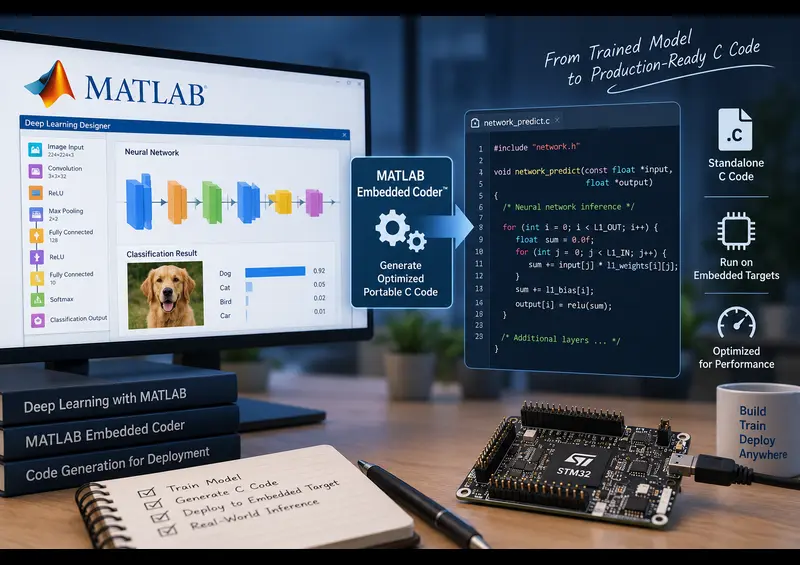
Deploying Neural Networks to Microcontrollers: The Hardware Reality
Training a deep neural network on a workstation with multiple gigabytes of VRAM is straightforward. Getting that same model to run on an STM32 board with 256 KB of SRAM and 1 MB of Flash memory is where most engineering projects run into trouble.
Desktop models rely on dynamic memory allocation, 32-bit floating-point math, and large runtime libraries. Microcontrollers cannot handle those overheads. MATLAB provides a direct path from a trained dlnetwork object to bare-metal C code through Embedded Coder and the CMSIS-NN library. Here is the process for configuring and flashing an inference pipeline to an STM32 board.
Prerequisites & Toolboxes
Make sure you have these packages installed from the MATLAB Add-On Explorer:
- MATLAB & Simulink
- Deep Learning Toolbox
- MATLAB Coder & Embedded Coder
- Embedded Coder Support Package for STMicroelectronics STM32 Processors
- Deep Learning Toolbox Support Package for ARM Cortex-M Processors
Step 1: Build or Import a Target-Friendly Network
Heavy models like ResNet-50 or YOLOv8 will not fit inside standard microcontrollers. For STM32 devices (such as the STM32F4, F7, or H7 series), stick to shallow 1D CNNs for vibration signals, or lightweight 2D architectures like MobileNetV2 with reduced width multipliers.
% Load your trained network
load('motor_fault_classifier.mat', 'trainedNet');

% Check parameter count and memory foot-print
analyzeNetwork(trainedNet);
Step 2: Create the Inference Entry-Point Function
MATLAB Coder requires a standalone MATLAB function that takes sensor inputs and returns class predictions or regression scores.
function prediction = predict_fault(sensorInput)
%#codegen

persistent net;
if empty(net)
    net = coder.loadDeepLearningNetwork('motor_fault_classifier.mat');
end

prediction = predict(net, sensorInput);
end
Step 3: Configure Code Generation for STM32 and CMSIS-NN
Set up a code generation configuration object. Specify an ARM target and select CMSIS-NN to use ARM's optimized vector kernels instead of generic C math.
% Create code generation config for a static library
cfg = coder.config('lib');
cfg.TargetLang = 'C';
cfg.GenCodeOnly = true;

% Configure deep learning code generation for ARM Cortex-M
dlcfg = coder.DeepLearningConfig('arm-cortex');
dlcfg.ArmArchitecture = 'armv7e-m'; % Adjust for your core (e.g., M4/M7)
dlcfg.ArmComputeVersion = 'CMSIS-NN';
cfg.DeepLearningConfig = dlcfg;

% Define fixed-size input data types (e.g., 128 sensor samples)
inputType = coder.typeof(single(0), [1 128 1]);

% Run code generation
codegen -config cfg predict_fault -args {inputType} -report
Step 4: Integrate Generated C Files into STM32CubeIDE
Once codegen completes, open the output codegen/lib/predict_fault/ directory:
- Copy the generated
.cand.hfiles into your STM32CubeIDE project'sCore/SrcandCore/Incfolders. - Include the ARM CMSIS-NN library in your GCC build path.
- In
main.c, callpredict_fault_initialize()once inside the peripheral initialization sequence. - Feed real ADC or accelerometer values directly into
predict_fault(inputBuffer, &output)inside your main processing loop or DMA callback.
Executable MATLAB Script & Model Setup
% =========================================================================
% Script: deploy_stm32_dl_pipeline.m
% Description: End-to-end 1D vibration fault classifier deployment targeting
%              STM32 microcontrollers (STM32F4/F7/H7) using Embedded Coder.
% =========================================================================

clc; clear; close all;

%% 1. Build 1D Vibration Feature Classifier for Edge Sensor
inputSignalLength = 128; % 128-point vibration/current window
numFaultTypes = 3;       % Normal, Bearing Fault, Gearbox Fault

layers = [
    sequenceInputLayer(inputSignalLength, 'Name', 'sensor_in')

    % 1D Convolution over temporal window
    convolution1dLayer(5, 8, 'Padding', 'same', 'Name', 'conv1d')
    batchNormalizationLayer('Name', 'bn')
    reluLayer('Name', 'relu')
    globalAveragePooling1dLayer('Name', 'gap')

    fullyConnectedLayer(numFaultTypes, 'Name', 'fc')
    softmaxLayer('Name', 'prob')
    classificationLayer('Name', 'fault_class')
];

%% 2. Generate Synthetic Sensor Signals & Train
numTrain = 150;
X = num2cell(rand(inputSignalLength, numTrain, 'single'), 1)';
Y = categorical(randi([1 numFaultTypes], [numTrain 1]));

opts = trainingOptions('adam', 'MaxEpochs', 4, 'MiniBatchSize', 16, 'Verbose', false);
vibrationNet = trainNetwork(X, Y, layers, opts);
save('vibrationNet.mat', 'vibrationNet');
fprintf('1D Classifier trained successfully.\n');

%% 3. Create Entry-Point Function for STM32 Firmware
entryPoint = [ ...
    "function classID = stm32_predict(rawVibration)" + newline + ...
    "%#codegen" + newline + ...
    "persistent net;" + newline + ...
    "if isempty(net)" + newline + ...
    "    net = coder.loadDeepLearningNetwork('vibrationNet.mat');" + newline + ...
    "end" + newline + ...
    "probs = predict(net, rawVibration);" + newline + ...
    "[~, maxIdx] = max(probs);" + newline + ...
    "classID = uint8(maxIdx);" + newline + ...
    "end" ...
];
writelines(entryPoint, 'stm32_predict.m');

%% 4. Configure STM32 Embedded Coder Profile
cfg = coder.config('lib');
cfg.TargetLang = 'C';
cfg.FilePartitionMethod = 'SingleFile'; % Clean integration into STM32CubeIDE

% Target ARM CMSIS-NN without dynamic heap allocation
dlcfg = coder.DeepLearningConfig('arm-cortex');
dlcfg.ArmArchitecture = 'armv7e-m';
dlcfg.ArmComputeVersion = 'CMSIS-NN';
cfg.DeepLearningConfig = dlcfg;

% Test with single 128-element buffer from ADC DMA
sampleInput = coder.typeof(single(0), [inputSignalLength 1]);

%% 5. Generate Target Files
codegen -config cfg stm32_predict -args {sampleInput}
fprintf('STM32 C source files ready in: %s\n', fullfile(pwd, 'codegen', 'lib', 'stm32_predict'));Related Verified MATLAB & Simulink Projects
Need pre-built, debugged Simulink models with complete parameter initialization scripts and documentation? Explore top related solutions:
Common Engineering Troubleshooting & Q&A
Frequently encountered bugs, solver convergence issues, and implementation questions answered by our engineering mentors:
Recommended Engineering Articles
Need Custom MATLAB / Simulink Implementation?
Our team of PhD engineers build custom simulation plants, train machine learning agents, tune PID/MPC controllers, and deliver complete, executable code with Turnitin reports.