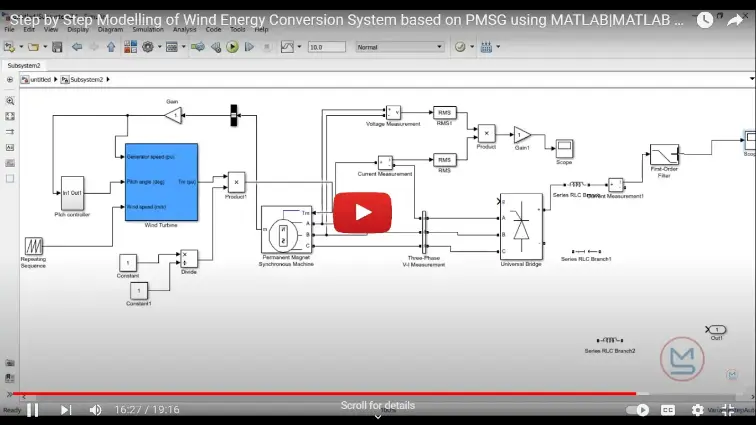
What is PMSG Wind Energy System Modelling in MATLAB: Step-by-Step?
PMSG Wind Energy System Modelling in MATLAB: Step-by-Step is a MATLAB-based technical project and simulation model. PMSG Wind Energy System Modelling in MATLAB This article explores the key concepts, techniques, and practical approaches behind PMSG Wind Energy System Modelling in MATLAB: Step-by-Step. The goal is to provide learners, researchers, and professionals with a clear understanding of how this technology works and how it can be applied in real-world scenarios. By covering fundamental principles, practical use cases, and examples, this content ensures that readers gain both theoretical and applied knowledge. Explore MATLABSolutions for simulating a 2 MW Direct Drive PMSG Wind Energy Conversion System (WECS). Model & optimize your WECS with MATLAB. Learn more now! Whether you are a student, engineer, or hobbyist, this comprehensive introduction will help you grasp the importance of PMSG Wind Energy System Modelling in MATLAB: Step-by-Step and how it is shaping advancements in the field. Keywords: PMSG Wind Energy System Modelling in
Project Methodology
This comprehensive step-by-step methodology helps you build, simulate, and validate a realistic PMSG-based wind energy system using MATLAB/Simulink . By following this structured approach, you'll achieve accurate modeling, optimal power extraction (often with MPPT control), and reliable results for academic projects, research papers, or industry prototypes.
Why Choose PMSG for Wind Energy Modelling in MATLAB?
- No gearbox required → reduced maintenance and losses
- High torque at low speeds → ideal for variable-speed operation
- Better power quality and grid integration
- Easy implementation in Simulink using Simscape Electrical or standard blocks
Common search terms: PMSG wind turbine MATLAB Simulink, step-by-step PMSG WECS modelling, direct-drive PMSG wind energy simulation.
Step-by-Step Methodology for PMSG Wind Energy System Modelling in MATLAB
Step 1: Define Project Objectives and Scope Clearly outline what your model aims to achieve. Typical goals include:
- Simulate power output under varying wind speeds
- Implement Maximum Power Point Tracking (MPPT)
- Analyze grid-connected or standalone performance
- Study dynamic response (e.g., voltage, current, torque)
Review key theory: aerodynamic power equation (P = 0.5 × ρ × A × v³ × Cp), PMSG d-q axis model, and converter control strategies.
Step 2: Data Collection and Parameter Setup Gather reliable parameters:
- Wind turbine: rated power (e.g., 2 MW), blade radius, cut-in/cut-out wind speeds, Cp(λ,β) lookup table
- PMSG: rated power, pole pairs, stator resistance Rs, inductances Ld/Lq, flux linkage
- Wind profile: use random wind data or predefined gusts from MATLAB Preprocess wind speed data (clean outliers, normalize units to m/s).
Step 3: Select Modelling Approach and Components Choose between:
- Simplified aerodynamic model (lookup tables for torque/power)
- Detailed 2-mass shaft model for drivetrain dynamics
- Full Simscape Electrical library for machine, rectifier, DC-DC converter, inverter Popular choice: Direct-drive PMSG with back-to-back converters (machine-side rectifier + grid-side inverter) for MPPT and grid synchronization.
Step 4: Build the Model in Simulink
- Open MATLAB → Simulink → New Model
- Add Wind Turbine block (or custom aerodynamic subsystem)
- Connect to Permanent Magnet Synchronous Machine (PMSM) block set as generator
- Implement machine-side control: Vector control or diode rectifier + boost converter for MPPT
- Add grid-side inverter with PLL and current control
- Include MPPT algorithm (e.g., Fuzzy Logic, Perturb & Observe, or optimal tip-speed ratio) Use Simscape > Electrical > Specialized Power Systems or Simscape Electrical for realistic physics.
Step 5: Implement Control Algorithms
- Machine-side: Field-oriented control (FOC) or simple torque control
- MPPT: Adjust generator torque/speed to track optimal λ (tip-speed ratio)
- Grid-side: Maintain DC-link voltage, inject active/reactive power Test subsystems individually before full integration.
Step 6: Run Simulation and Validate Results
- Simulate under step/gust/random wind profiles
- Monitor key outputs: rotor speed, electromagnetic torque, stator currents (d-q), DC-link voltage, active power
- Compare with benchmarks (e.g., MATLAB File Exchange models or published papers) Refine parameters if torque ripple or instability occurs.
Step 7: Analyze Results and Derive Insights Plot waveforms using Scope or MATLAB figures:
- Power vs. wind speed curve
- Efficiency comparison with DFIG/SCIG
- Dynamic response during faults or wind changes Highlight advantages: higher energy yield at low winds, reduced mechanical stress.
Step 8: Document and Optimize
- Add comments, masked subsystems, and annotations in Simulink
- Export plots, create reports with explanations
- For SEO/blog: Use headings, include keywords naturally (e.g., “PMSG Wind Energy System Modelling in MATLAB Step-by-Step”), add images/screenshots
- Suggest improvements: Add pitch control, battery storage, or real-time simulation with Speedgoat
Practical Applications of PMSG Wind Energy Modelling
- Standalone off-grid systems
- Grid-tied wind farms
- Hybrid renewable setups (wind + solar)
- Research in MPPT algorithms, fault ride-through, and microgrids
This structured PMSG Wind Energy System Modelling in MATLAB: Step-by-Step framework delivers accurate, reproducible simulations.
Verified MATLAB Simulation Code Demonstration
Syntax-highlighted executable code demonstration for PMSG Wind Energy System Modelling in MATLAB: Step-by-Step:
% MATLAB Constrained Numerical Optimization
clc; clear; close all;

obj_fun = @(x) (x(1)-2)^2 + (x(2)-3)^2;
x0 = [0, 0]; A = [1, 2]; b = 4; lb = [0, 0];

options = optimoptions('fmincon', 'Display', 'off', 'Algorithm', 'sqp');
[x_opt, fval] = fmincon(obj_fun, x0, A, b, [], [], lb, [], [], options);

fprintf('Optimization Solved: Minimum Value = %.4f\n', fval);