To generate a custom bitstream to deploy a deep learning network to your target device, use the dlhdl.ProcessorConfig object.
-
Create a
dlhdl.ProcessorConfigobject.hPC = dlhdl.ProcessorConfig;
-
Setup the tool path to your design tool. For example, to setup the path to the Vivado® design tool, enter:
hdlsetuptoolpath('ToolName', 'Xilinx Vivado', 'ToolPath', 'C:\Xilinx\Vivado\2019.2\bin\vivado.bat'); -
Generate the custom bitstream.
dlhdl.buildProcessor(hPC);
-
After the bitstream generation is completed, you can locate the bitstream file at
cwd\dlhdl_prj\vivado_ip_prj\vivado_prj.runs\impl_1, wherecwdis your current working directory. The name of the bitstream file issystem_top_wrapper.bit. The associatedsystem_top_wrapper.matfile is located in the top level of thecwd.To use the generated bitstream for the supported Xilinx® boards, you should copy the
system_top_wrapper.bitandsystem_top_wrapper.matfiles to the same folder.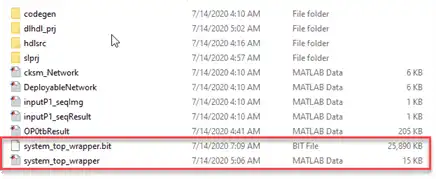
To use the generated bitstream for the supported Intel® boards, you should copy the
system_core.rbf,system.mat,system_periph.rbf, andsystem.soffiles to the same folder.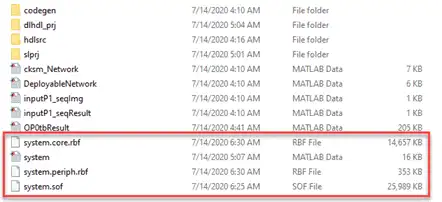
-
Deploy the custom bitstream and deep learning network to your target device.
hTarget = dlhdl.Target('Xilinx');
snet = alexnet;
hW = dlhdl.Workflow('Network',snet,'Bitstream','system_top_wrapper.bit','Target',hTarget);
% If your custom bitstream files are in a different folder, use:
% hW = dlhdl.Workflow('Network',snet,'Bitstream',...
'C:\yourfolder\system_top_wrapper.bit','Target',hTarget);
hW.compile;
hW.deploy;