Question
I am trying to find a simple way of converting images received from ROS into matrix form that can then be processed in Simulink. On Matlab side there are the writeImage and readImage functions that can be used to convert ROS Image to matlab image but I am not sure what should be the correct way of doing this on Simulink side. One option would be to get the raw data from Image topic and reorganize it into matrix form, but that processing is always dependent on the image size and format. Is there any simple way of doing this?
Expert Answer

Prashant Kumar
PhD Expert
Answered Oct 14, 2026
You are correct that readImage and writeImage functions are for MATLAB use only since they work on ROS topic objects. However in Simulink we work with buses. The straight forward way that I could think of to deal with this is to unpack the image on your own in a MATLAB function block. So you could have a model like this:
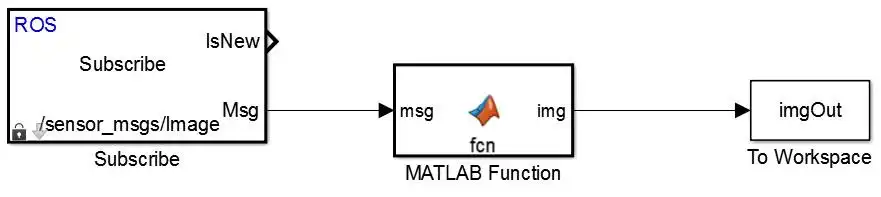
And inside the MATLAB function block, you could write the following function:
function img = fcn(msg)
%#codegen

%Get msg details
imgData = msg.Data;
imgH = msg.Height;
imgW = msg.Width;

%Create blank image output with required size
img = zeros(msg.Width,msg.Height,3);

%Reshape image data
imgR = reshape(imgData(1:3:end),imgW,imgH)';
imgG = reshape(imgData(2:3:end),imgW,imgH)';
imgB = reshape(imgData(3:3:end),imgW,imgH)';
img(:,:,1) = imgR;
img(:,:,2) = imgG;
img(:,:,3) = imgB;
Note that this example assumes image is in the RGB color space.
100% Run Guarantee
3-Hour Fast-Track Delivery
Need a Custom Version or Complete Simulation for This Problem?
Our 500+ PhD engineers build, debug, and optimize working MATLAB scripts and Simulink (.slx) models tailored to your exact assignment rubrics with zero plagiarism.
Tested on MATLAB R2024b / R2026a
Turnitin 0% Plagiarism Report
Free 7-Day Revisions Guarantee
Have a different question? Ask here
Related ros Questions & Solutions
Browse All →
Explore similar technical troubleshooting questions and verified MATLAB solutions:
Ready-to-Run MATLAB & Simulink Projects
Browse All Projects →